Docs Multi-Month Grid
The Multi-Month view displays multiple individual months. Either install via script tags or ES build system.
There are numerous other options throughout the docs that affect the display of Multi-Month view, such as the date/time display options and locale-related options.
Year as a Grid
The multiMonthYear view displays a 3x4 grid of months. However, if space does not allow, it will responsively shift to 2x6 or even 1x12. The singleMonthMinWidth setting ultimately determines the number of columns. Example:
import { Calendar } from 'fullcalendar'
import multiMonthPlugin from 'fullcalendar/multimonth'

let calendar = new Calendar(calendarEl, {
  plugins: [multiMonthPlugin],
  initialView: 'multiMonthYear'
})Year as a Stack
The multiMonthYear view can be configured as a single column (aka “stack”). View docs specifically for Multi-Month Stack »
Custom Duration
You can create Multi-Month views with arbitrary durations. The following creates a 4-month view:
import { Calendar } from 'fullcalendar'
import multiMonthPlugin from 'fullcalendar/multimonth'

const calendar = new Calendar(calendarEl, {
  plugins: [multiMonthPlugin],
  initialView: 'multiMonthFourMonth',
  views: {
    multiMonthFourMonth: {
      type: 'multiMonth',
      duration: { months: 4 }
    }
  }
})
Single Month Render Hooks
Customize the appearance of each individual month within Multi-Month view.
Single Month Header Render Hooks
In Multi-Month view, the month header is the title element above each month grid (e.g. "January 2025").
Multimonth-specific Options
multiMonthMaxColumns
The maximum columns of months that Multi-Month Grid will attempt to render.
singleMonthMinWidth
Multi-Month Grid will not allow each mini-month to be become smaller than this pixel value. This value includes padding.
singleMonthTitleFormat
In Multi-Month views, the format of the text above each month.
See Also
showNonCurrentDates
In month view, whether dates in the previous or next month should be rendered at all.
fixedWeekCount
Determines the number of weeks displayed in a month view.
businessHours
Emphasizes certain time slots on the calendar. By default, Monday-Friday, 9am-5pm.
weekends
Whether to include Saturday/Sunday columns in any of the calendar views.
Demo:
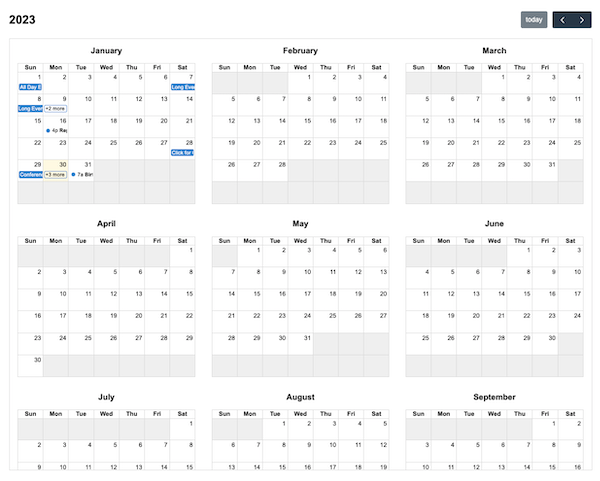
multiMonthYear as a grid