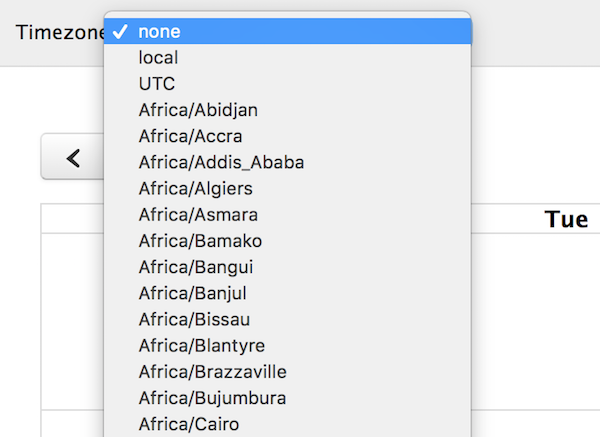
Docs timeZone
A time zone is a region of the world that serves as a context for displaying dates. It affects a Calendar instance in the following ways:
- How the datetime text renders on events
- The positioning of events. Which day or which part of the time axis an event is on top of.
- The way in which you should interpret the exposed native Date objects throughout the API, such as an Event Object’s
start/end, a View object’sactiveStart/activeEnd, or the dates exposed by thedateClickorselectcallbacks. Read more about Date Objects. - When event data is requested, the dates given to an events function or json feed
- When event data is received, the way in which dates are parsed. This only affects dates that were supplied with no time zone information, aka ISO8601 date strings that do not supply a UTC offset. Read more about Date Parsing.
Here are the values you can enter for the timeZone setting and how they behave:
'local' (the default)
Every browser has a default time zone, which is usually determined by the settings of the user’s operating system. This is considered the “local” time zone. It will vary for different users of you calendar, depending on where they live or how they have their computer configured.
If your events’ dates were defined relative to UTC, either via a millisecond time or an ISO8601 string with a UTC offset, then your dates will be appropriately shifted to display in the user’s local time zone. If your dates were supplied as ISO8601 strings without UTC offsets, they will be parsed (and thus displayed) as if they were local.
When using the dates emitted from the API, you’ll want to access their local values via methods like getMonth(), getHours(), and toString(). Read more about Date Objects.
An example to summarize this behavior: (the placeholder XX:XX signifies the local time zone offset, which will vary)
const calendar = new Calendar(calendarEl, {
  timeZone: 'local', // the default (unnecessary to specify)
  events: [
    { start: '2018-09-01T12:30:00Z' }, // will be shifted from UTC to local
    { start: '2018-09-01T12:30:00+XX:XX' }, // already same offset as local, so won't shift
    { start: '2018-09-01T12:30:00' } // will be parsed as if it were '2018-09-01T12:30:00+XX:XX'
  ],
  dateClick: function(info) {
    console.log(info.date.toString()); // use *local* methods on the native Date Object
    // will output something like 'Sat Sep 01 2018 00:00:00 GMT-XX:XX (Eastern Daylight Time)'
  }
});
'UTC'
Whereas the local timezone will vary from browser to browser, the UTC time zone is guaranteed to be the same in every browser. It will also not experience daylight savings times. The UTC time zone was designed this way and it serves as a time zone that other time zones define themselves relative to.
If your events’ dates are defined as ISO8601 strings with UTC offsets, then your dates will be appropriately shifted to display in the 00:00 offset. If your dates were supplied as ISO8601 strings without time zone offsets, they will be parsed (and thus displayed) as if they were UTC.
When using the dates emitted from the API, you’ll want to access their UTC values via methods like getUTCMonth(), getUTCHours(), and toUTCString(). Read more about Date Objects.
In summary:
const calendar = new Calendar(calendarEl, {
  timeZone: 'UTC',
  events: [
    { start: '2018-09-01T12:30:00Z' }, // already in UTC, so won't shift
    { start: '2018-09-01T12:30:00+XX:XX' }, // will shift to 00:00 offset
    { start: '2018-09-01T12:30:00' } // will be parsed as if it were '2018-09-01T12:30:00Z'
  ],
  dateClick: function(info) {
    console.log(info.date.toUTCString()); // use *UTC* methods on the native Date Object
    // will output something like 'Sat, 01 Sep 2018 00:00:00 GMT'
  }
});
If you’d like all your events to display consistently across browsers regardless of your users’ local time zones, UTC will achieve that. However, if you are leveraging UTC to simulate some other real time zone, please see Named Time Zones instead.
Named Time Zones
A named time zone is a specific region of the world specified by a string like 'America/New_York' or 'Europe/Moscow'. Just like the UTC time zone, it will display consistently across browsers because there is no ambiguity.
const calendar = new Calendar(calendarEl, {
  timeZone: 'America/New_York',
  events: [
    { start: '2018-09-01T12:30:00Z' }, // will be shifted from UTC to America/New_York
    { start: '2018-09-01T12:30:00' } // will be parsed as if it were '2018-09-01T12:30:00[America/New_York]'
  ],
  dateClick: function(info) {
    console.log(info.date.toString()); // will output local (NOT America/New_York)
    console.log(info.date.toUTCString()); // will output UTC
  }
});
The resulting date objects from the API (like info.date above) only effectively support local and UTC time zones. If you’d like a date object that truly reflects the calendar’s time zone, you’ll need to use Temporal (below).
Using Temporal
Temporal is the new defacto browser API for working with dates and times. The temporal-polyfill package is already a peer dependency of FullCalendar, meaning if you have FullCalendar installed, you also have temporal-polyfill installed.
Import the polyfill and craft a ZonedDateTime object like so:
// necessary for Temporal global and Date.prototype.toTemporalInstant
+ import 'temporal-polyfill/global'

// extract as const
+ const timeZone = 'America/New_York'

  const calendar = new Calendar(calendarEl, {
-   timeZone: 'America/New_York',
+   timeZone,
    events: [
      { start: '2018-09-01T12:30:00Z' }, // will be shifted from UTC to America/New_York
      { start: '2018-09-01T12:30:00' } // will be parsed as if it were '2018-09-01T12:30:00[America/New_York]'
    ],
    dateClick: function(info) {
-     console.log(info.date.toString()); // will output local (NOT America/New_York)
-     console.log(info.date.toUTCString()); // will output UTC

+     const zdt = info.date.toTemporalInstant().toZonedDateTimeISO(timeZone);
+     console.log(zdt.toString()); // will output America/New_York
    }
  });
In the future, FullCalendar will amend its API to make Temporal object creation easier.